Web's Skeleton
In web development, "the web's skeleton" refers to the underlying structure of a webpage, primarily defined by HTML. HTML provides the framework, like a skeleton, that holds all the content and defines how it should be organized and displayed.
HTML as the Foundation:
HTML (HyperText Markup Language) is the core language for creating web pages. It's like the skeleton of a website, providing the basic structure and organization.

Structure and Content:
HTML uses tags to define various elements of a webpage, such as headings, paragraphs, images, links, and more. These tags create the skeletal framework on which the content is placed.
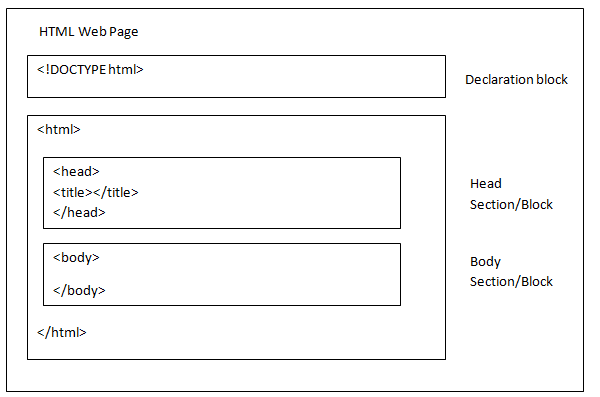
<!DOCTYPE html>: This declaration informs the browser about the document's type, specifying it as an HTML5 document.
<html>: The root element of the HTML document, encompassing all other elements.
<head>: Contains metadata about the page, including the title, character set, viewport settings, and links to external resources like CSS or JavaScript files.
<body>: Contains the visible content of the web page, such as text, images, links, and other elements that are displayed in the browser.
Nested Structure: HTML elements are often nested within each other, creating a hierarchical structure. For example, a <p> (paragraph) element might be nested inside the <body> element, and a <h1> (heading) element might be nested inside the <body> element as well.
there is also a tag in html basic boiler code as we known as meta tags
meta tag: In HTML, the <meta> tag provides metadata, or "data about data", about the HTML document. This information is primarily used by search engines and browsers, not displayed on the webpage itself. Metadata can include details like character set, author, keywords, and a description of the page
Placement: <meta> tags are placed within the <head> section of an HTML document.
Purpose: They provide information about the document to search engines and browsers, such as:
Character set: Specifies the encoding for the page's text (e.g., UTF-8).
Author: Identifies the author of the document.
Keywords: (Although their impact on SEO is diminishing, they can still be used).
Description: Provides a brief summary of the page's content.
Viewport: Controls how the page is rendered on different devices(e.g., phones, tablets).
Attributes: The most common attributes used with <meta> are:
http-equiv : Used for HTTP headers, like
Content-Typeto specify the character set.name : Specifies the name of the metadata (e.g., "keywords", "description").
content : Provides the value or content associated with the metadata.
Example:
<meta charset="UTF-8">
<meta name="author" content="Your Name">
<meta name="keywords" content="HTML, CSS, JavaScript">
<meta name="description" content="A sample web page for learning">
SEO Importance : While the direct impact of keywords on SEO is less significant than it used to be, meta tags, especially the description, remain important for:
Search engine snippets: The description is often used by search engines to display a snippet of the page in search results, helping users decide if the page is relevant.